HomeUser Guide › Backup & restore
Backup & restore

Your setup, on the next phone

One file holds every preference you have set - theme, bottom bar, dashboard layout, polling, units. It deliberately holds no credentials at all.

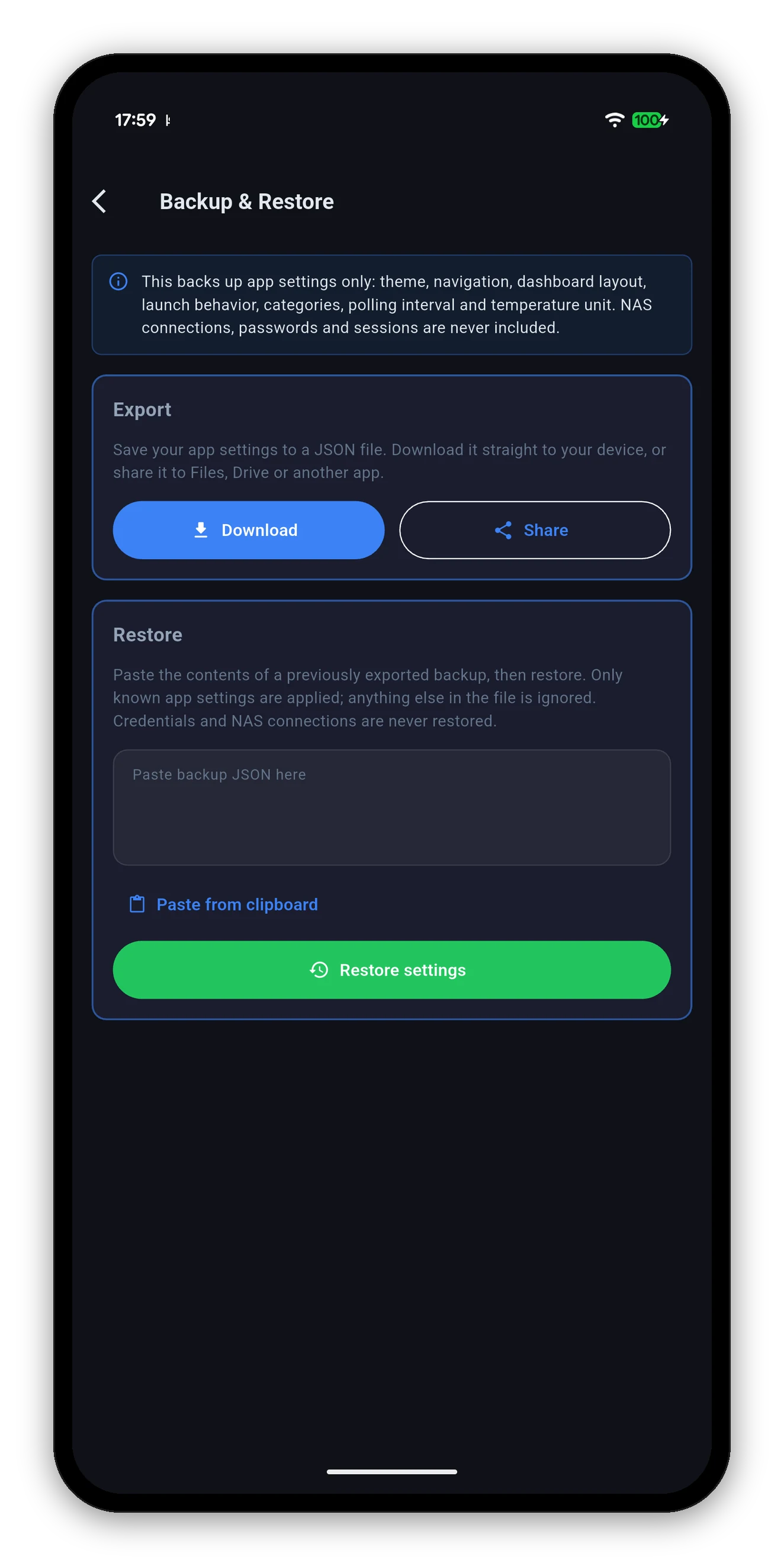
The Backup and Restore screen with Export and Restore
What is in the file

And what is not

Included

  • Theme, surface, accent colour and text size.
  • The bottom navigation bar and its order.
  • Dashboard layout and which cards are on.
  • Dashboard categories.
  • Launch behaviour.
  • Polling interval.
  • Temperature unit.

Never included

  • NAS connections - addresses, ports and options.
  • Passwords.
  • Sessions and 2FA device tokens.
That exclusion is the point. A file you can email to yourself and drop in a cloud folder is a file that can leak. Credentials live in the device keychain or keystore precisely so an export cannot reach them, and the app does not make an exception for its own convenience.
Export

Getting the file out

Settings › Backup & Restore, then one of two buttons.

Restore

Putting it back

  1. Open the backup file and copy its contents.
  2. Paste into the Restore box, or tap Paste from clipboard.
  3. Tap Restore settings.
  4. Add your NAS again - that part was never in the file.
Unknown entries are ignored, not rejected. Only settings the app recognises are applied, so a backup taken from an older version restores cleanly into a newer one - the settings that did not exist then simply stay at their defaults.
Related

Not to be confused with

Common questions

Backup & restore FAQ

What does the settings backup include?
App settings only: theme, navigation, dashboard layout, launch behaviour, categories, polling interval and temperature unit. NAS connections, passwords and sessions are never included.
Why are my NAS credentials not backed up?
Because a portable file containing NAS passwords is a portable file containing NAS passwords. Credentials live in the device keychain or keystore, which an export deliberately cannot reach.
How do I move to a new phone?
Export on the old one, get the file across, install the app, paste the contents into Restore, and add your NAS again.
What happens to settings the file does not know about?
Only known settings are applied and anything else is ignored, so an older backup restored into a newer app leaves the new settings at their defaults.
Something not working?

The troubleshooting guide covers connection failures, blank tiles, missing tabs and stale widgets.

Troubleshooting →   Back to the guide